Howdy y'all. I just arrived in Phoenix, AZ (world's largest suburban shopping center) from Dallas, TX where I was visiting family. Tomorrow I'll most likely be going to the National Championship game but in the meantime I've been thinking a bit about my project for this course. Actually, I've been thinking about it for quite some time.
I currently work as professor Arellano's assistant in the EMDA center. Part of my job there is to think about ways in which we can improve the center and the EMDA program in general. Although the center itself is in an amazing location with a fantastic view of the campus, I feel the look could be improved in a way that really shows the physical side of digital media. The EMDA center has some fantastic tall bay windows which I would like to work with in order to create something that hasn't really been done on the campus before: Interactive window projections.
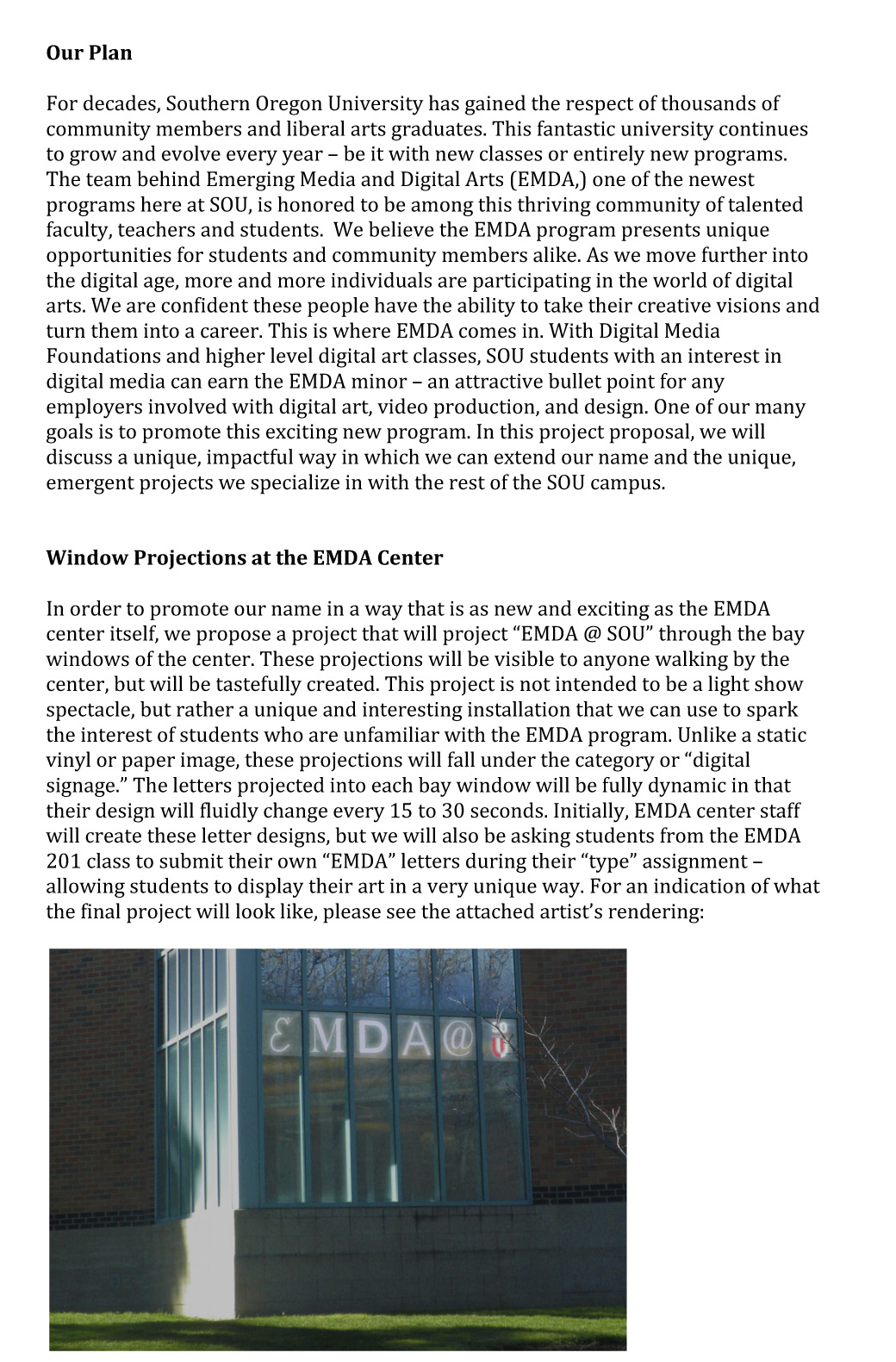
During one of our class sessions, professor Arellano used window projections as one of his project examples. I have also been thinking about how cool a projected image would look in the center's windows and would like to take it a step further. The bay windows at the EMDA center come out of the building at a 45 degree or so angle. Each side contains six window columns. At the center we decided that "|E|M|D|A|@|SOU (the school logo)| would be the most appropriate thing to project. To do this we will use four small projectors - one for every three window columns.
Rather than simply project a static image, I would like to do something much more unique. Each of the "EMDA" letters will have multiple unique designs done in a way similar to the "type" project in DMF 201. I can create these images myself initially, but in the future it would be more fun for people if we used work from DMF students. These letters will change every 15 to 30 seconds randomly to a new design.
If we have the resources, I would love to add one final touch. Since the bay windows are viewable from the path that leads to the SU, I would like to have some kind of buttons or pads alongside the path. Each button would correspond to a different EMDA letter and when pressed, the letter would change to a different design instantly (and perhaps flash to a different color very briefly for more of a visual impact.)
This project is going to involve a lot of variables. I will need to determine which projectors we need, where they need to placed, and any other things one might need to know about window projections. I will then need to create a lot of different letter designs, and figure out how to create a looping yet interactive video in Adobe Flash. Even if we do not have the funds or ability to make this thing interactive, I will still try to create something interactive. If the buttons or pads can't be used outside, we could certainly do it in the center.
Anyway, that's my proposal. I think it could be a really awesome addition to the EMDA center and would be one of the most unique visuals on campus after it starts to get dark. Hope everyone had a good weekend and I'll see everyone next week. Go Ducks!